How I manage my website in Emacs
1. What I tried and where I ended up
I keep all my notes in Org format. Initially, I tried creating one of my websites in WordPress. It was convenient and quick to set up, including using some plugin for a bilingual site. But the procedure of creating a post started to tire me out: I had to paste the text from an Org file (well, where else would I write? :), then replace the formatting, then configure language versions. I know there are plugins for creating posts from Markdown, but they wouldn't solve all the problems.
I wanted something minimal and fast from a website. So I started looking at static site generators. I tried Hugo, Pelican, and StatiCL. I liked the last one the most. But almost everywhere, normal operation required using Markdown and there were problems with two language versions.
In parallel, I was studying and configuring org-publish. I liked this more, but the configuration was turning into a huge pile of code. So I decided to write my own solution with the help of LLM. I currently know elisp very poorly, but with LLM the issue was resolved quite quickly.
2. MOSG
I named my solution Multilanguage Org Static site Generator — mosg (In Russian, it is pronounced the same as "brain", just a funny coincidence). It's not publicly available yet because it's in development and contains a bunch of not-so-great LLM-generated code.
This is what my work with the site looks like now.
2.1. File structure
❯ tree -L2 -d content
content
├── en
│   ├── guides
│   ├── misc
│   ├── sf
│   └── tech
├── images
└── ru
    ├── guides
    ├── misc
    ├── sf
    └── tech
All Org files are located in the content folder, which contains a folder for all images and folders for language versions of the site. The latter contain folders for sections and the posts themselves in them.
In the root of language folders are index.org files, which are responsible for the main page. In the root of section folders, index.org is automatically generated, containing a list of posts.
The static folder contains files that are copied to the site root as is. The html folder contains templates for the HTML head section, as well as language versions for the site header and footer.
A specific section looks like this:
❯ tree content/en/misc
content/en/misc
├── index.org
├── multipotentiality-in-the-modern-world.org
├── what-i-don-t-like-about-telegram.org
└── what-if-you-paid-people-to-do-what-they-already-want-to-do.org
Its final version on the site:
❯ tree public/misc
public/misc
├── index.html
├── multipotentiality-in-the-modern-world
│   └── index.html
├── rss.xml
├── what-i-don-t-like-about-telegram
│   └── index.html
└── what-if-you-paid-people-to-do-what-they-already-want-to-do
    └── index.html
That is, the Org file name is used as the path in the site address. You can also choose whether to use specific files in paths or pretty URLs. I use the latter, so the full path to a page looks like this:
/misc/what-i-don-t-like-about-telegram/
Instead of:
/misc/what-i-don-t-like-about-telegram.html
2.2. Configuration
Here's my configuration for site languages and sections:
(setq mosg-languages '("en" "ru")
      mosg-default-language "en")

(setq mosg-language-config
    '(("en" . ((:locale . "en_US")
               (:date-format-full . "%1$s %2$d, %3$d")  ; "January 18, 2026"
               (:date-format-day-month . "%2$d %1$s") ; "18 January"
               (:months . ["January" "February" "March" "April" "May" "June"
                           "July" "August" "September" "October" "November" "December"])
               (:months-short . ["Jan" "Feb" "Mar" "Apr" "May" "Jun"
                                 "Jul" "Aug" "Sep" "Oct" "Nov" "Dec"])
               (:ui-published . "Published:")
               (:ui-updated . "Updated:")))
      ("ru" . ((:locale . "ru_RU")
               (:date-format-full . "%2$d %1$s %3$d")  ; "18 января 2026"
               (:date-format-day-month . "%2$d %1$s") ; "18 января"
               (:months . ["января" "февраля" "марта" "апреля" "мая" "июня"
                           "июля" "августа" "сентября" "октября" "ноября" "декабря"])
               (:months-short . ["янв" "фев" "мар" "апр" "мая" "июн"
                                 "июл" "авг" "сен" "окт" "ноя" "дек"])
               (:ui-published . "Опубликовано:")
               (:ui-updated . "Обновлено:")))))

(setq mosg-sections
    '((tech . ((:titles . (("en" . "Tech Blog")
                           ("ru" . "Технические посты")))
               (:rss-titles . (("en" . "Flin: Tech Blog")
                               ("ru" . "Флин: Технические посты")))
               (:descriptions . (("en" . "Technical articles and programming notes")
                                 ("ru" . "Технические статьи и заметки о программировании")))))
      (sf . ((:titles . (("en" . "Science Fragments")
                         ("ru" . "Научные фрагменты")))
             (:rss-titles . (("en" . "Flin: Science Fragments")
                             ("ru" . "Флин: Научные фрагменты")))
             (:descriptions . (("en" . "Information from various sciences from an amateur")
                               ("ru" . "Информация из разных наук от дилетанта")))))
      (guides . ((:titles . (("en" . "Various guides")
                             ("ru" . "Различные руководства")))
                 (:rss-titles . (("en" . "Flin: Guides")
                                 ("ru" . "Флин: Руководства")))
                 (:descriptions . (("en" . "Various technical manuals")
                                   ("ru" . "Различные технические руководства")))))
      (misc . ((:titles . (("en" . "Various Posts")
                           ("ru" . "Разные посты")))
               (:rss-titles . (("en" . "Flin: Various Posts")
                               ("ru" . "Флин: Разные посты")))
               (:descriptions . (("en" . "What does not fit into other sections")
                                 ("ru" . "Что не подходит в другие разделы блога")))))))
It defines available site languages, its sections, localization and date format, as well as section titles and descriptions.
The current version with all settings is here.
2.3. Creating a post
Through a key combination, I invoke mosg-create-post and it does the following:
- Lets me select a site section.
- Requests the post title in Russian.
- Translates it into a human-readable URL: "How I spent my summer" ->
how-i-spent-my-summer - Translates the title into English and allows me to keep it or edit it.
- Does step 3 for the English title.
- Creates two Org files with Russian and English versions, switches to the Russian version buffer.
2.4. File properties
The following additional properties for the entire Org file are understood:
date,updated: dates when the post was written and updated.translation: the filename without extension of the post version in another language. If absent, a warning will be displayed during site generation. I need this to understand that there are no errors in linking translations anywhere. Can be set tonil, which means there is no translation for the post in another language.toc: whether or not to include a table of contents for the post. Overrides the global setting.meta_desc: the content of themeta descriptiontag, may be absent.og_image: OpenGraph image. If absent, the global setting is applied.og_title: OpenGraph title. If absent, the page title is used.og_desc: OpenGraph description. If absent,meta_descis used.
For example, this post:
title: How I manage my website in Emacs
date:  2026-01-27
translation: kak-ia-vedu-svoi-sait-v-emacs
meta_desc: Description of how I chose between different website generators and settled on my decision to use Emacs
2.5. Images
To insert an image into a post, you can call mosg-insert-image. This command asks where I want to get the image from: clipboard or file. If from a file, then I select it next; I plan to add thumbnail display. If from clipboard, a temporary file is created with its contents.
Then the image is cropped to the needed maximum dimensions, compressed, converted to the required format (for me it's webp) and copied to the site's image folder. Then a link to it is inserted at the cursor position.
2.6. Links to other posts
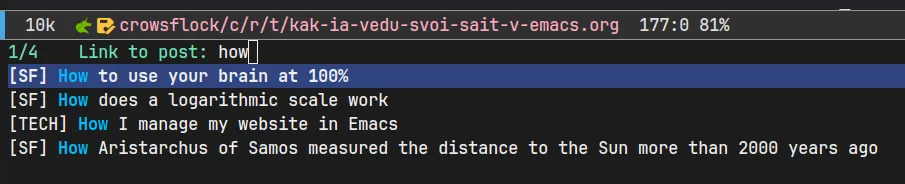
I can execute the mosg-insert-port-link command, it will let me choose in a convenient way which post I want to link to, displaying current titles and site section.
2.7. SEO
There's a command that generates meta description for the current post in the buffer through LLM. There's also a command that does the same for all site posts where the meta_desc property is absent.
I did this, among other things, to create descriptions in one go for accumulated posts that I was transferring from Telegram.
Tags canonical, og and twitter are correctly inserted. Sitemap with linked language versions of posts and site sections is correctly generated.
2.8. RSS
Separate RSS files are generated for language versions and site sections, so you can flexibly choose what to subscribe to. They contain full text of posts.
2.9. Generation and deployment
With one command mosg-build you can generate the site. It stores post checksums in a separate file and generates HTML only for posts with changes.
The mosg-deploy command asynchronously calls the configured shell command (for me it's rsync) and shows the result in a separate window.
3. Conclusion
At the moment I'm very satisfied with the result. I can write posts with any formatting in my favorite editor, everything I need is done through key combinations in it, and as a result I get a website that looks and works the way I want.